
Overview · Getting started
Welcome to School Manager Uganda
A practical handbook for the people running your school. Learn one task at a time, with screenshots to guide you.
On this page
Your school, one connected workspace
School Manager Uganda brings student records, academic work, fees, reporting, and school administration into one workspace. This handbook explains where to go, what to enter, and what to check before moving on.
Start with First day setup if you are preparing a school account. If your school is already using the system, choose a guide from the navigation or search for the task you need.
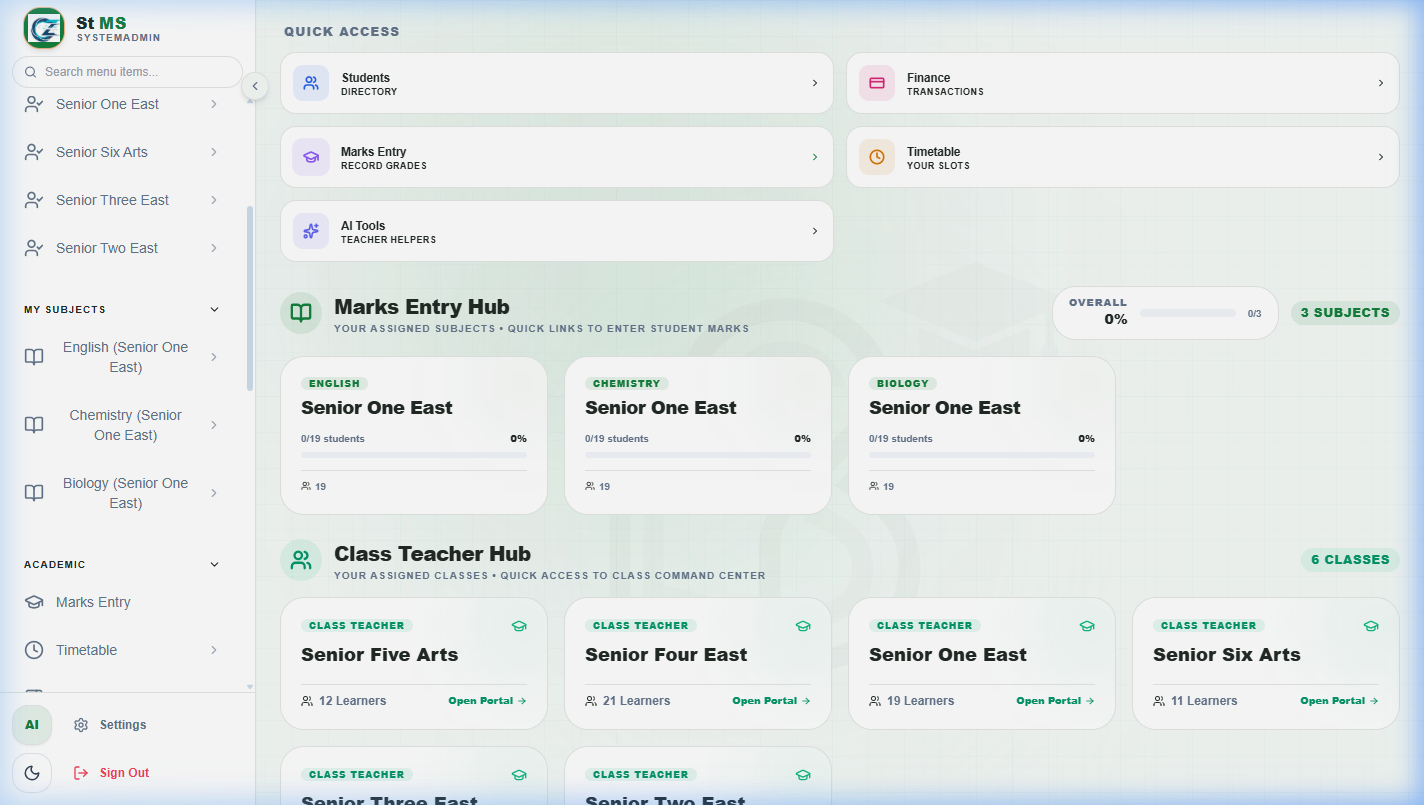
Find your way around
 View full screen
- Left navigation: open the modules your role can access.
- Academic period: check the term and year before working with term-based records.
- Main workspace: review information, filter records, and open the actions for that module.
How to use this handbook
Each guide introduces the task, breaks it into steps, and explains the relevant screen. Select a screenshot to open it at full size. Use the page outline to jump to a section and the next-guide link to continue.
When you need help
If a module is missing, first ask your school administrator to check your role. For product support, contact Avizon Innovations at avizoninnovations@gmail.com, 0789818880, or 0741353693. Include the page name and what you were trying to do.